
Running your business manually limits your growth potential and drains resources that could fuel expansion. You’re not alone. 73% of small businesses still rely on manual processes for at least three core operations. AI automation offers entrepreneurs a practical path to streamline workflows, recover lost revenue, and enhance customer experiences without the overhead of hiring additional staff. This guide shows you exactly how to implement AI automation in your business in 2026.
Table of Contents
- Understanding Why AI Automation Matters For Entrepreneurs
- Preparing Your Business For AI Automation
- Executing AI Automation: Step-By-Step Implementation Guide
- Verifying Results And Troubleshooting Common Challenges
- Discover SimplyAI Solutions For Your Business
- Frequently Asked Questions
Key takeaways
| Point | Details |
|---|---|
| Manual processes limit growth | Most small businesses handle core operations manually, creating bottlenecks that prevent scaling and increase error rates. |
| AI recovers significant revenue | Automated reminders and rebooking recover 60-70% of lost revenue from no-shows and abandoned carts. |
| Cost-effective scaling | AI agent workflows cost a fraction of hiring full-time employees while scaling instantly. |
| Quick deployment wins | Building repeatable workflow templates lets you serve more clients with consistent quality in hours, not weeks. |
Understanding why AI automation matters for entrepreneurs
Manual workflows kill momentum. You’re juggling customer inquiries, managing appointments, following up on leads, and handling administrative tasks that eat your day. Every manual step introduces delays and potential errors that frustrate customers and cost you money.
The competitive landscape shifted dramatically. Businesses that automate gain speed and consistency advantages that manual operations simply cannot match. While you’re manually processing orders or scheduling appointments, automated competitors respond instantly, operate 24/7, and scale without proportional cost increases.
Consider these realities:
- Manual data entry errors cost businesses an average of 20% in lost productivity
- Customer inquiries left unanswered for more than 2 hours see a 35% drop in conversion rates
- Repetitive tasks consume 40-60% of knowledge worker time that could focus on growth activities
- Hiring additional staff to handle volume increases operating costs by $40,000-$60,000 per employee annually
“AI agent workflows offer cost-effective, scalable solutions compared to hiring staff, allowing small businesses to compete with larger enterprises on efficiency and customer experience.”
AI automation is reshaping how enterprises operate, and small businesses that adopt these tools early gain significant competitive advantages. The barrier to entry has dropped dramatically. You don’t need a technical team or massive budget to implement effective AI automation in 2026.
The opportunity is clear. Building repeatable workflow templates that deploy in hours lets you serve more clients with consistent quality and predictable margins. The question isn’t whether to automate, it’s where to start.
Preparing your business for AI automation
Successful automation starts with clear visibility into your current workflows. Map out your daily operations and identify tasks you repeat constantly. These repetitive processes are prime candidates for automation.
Start by auditing these areas:
- Customer inquiry responses and initial engagement
- Appointment scheduling and reminder systems
- Order processing and fulfillment tracking
- Invoice generation and payment follow-ups
- Data entry and record updates across systems
- Social media posting and customer service monitoring
Gather the data that powers these workflows. Document your current processes, response templates, decision trees, and integration points. AI workflows need clean input data and clear business rules to function effectively.

Small wins build momentum. Rather than attempting to automate everything at once, identify one high-impact, low-complexity workflow to pilot. Customer appointment reminders, for example, deliver measurable ROI quickly while teaching you the fundamentals of AI agents and workflow design.
Your team needs preparation too. Building an AI-first organization requires clear communication about how AI supports their work rather than replacing it. Explain that automation handles repetitive tasks so they can focus on complex problem-solving and relationship building where humans excel.
Pro Tip: Test automation in a controlled environment before broad rollout to avoid disrupting customer experiences. Run parallel systems initially, comparing automated outputs against your current manual processes to catch issues before they reach customers.
Document your success metrics upfront. Define what “better” looks like for each workflow you automate. Response time improvements? Error reduction percentages? Revenue recovered? Clear metrics let you prove ROI and justify expanding automation across more operations.
Executing AI automation: step-by-step implementation guide
Implementation follows a clear progression from tool selection through pilot testing to full deployment. Here’s your roadmap:
- Select AI tools that integrate with your existing systems (CRM, scheduling software, email platforms, payment processors)
- Design workflows starting with simple, rules-based processes that have clear inputs and outputs
- Configure initial automation with conservative parameters and human oversight triggers
- Launch pilot with a small customer segment or internal team testing
- Collect feedback and performance data for two weeks minimum
- Refine workflows based on real-world results and edge cases discovered
- Scale gradually to larger customer segments while monitoring quality
- Expand to additional workflows using lessons learned from initial success
Focus first on customer engagement workflows. These deliver immediate ROI while building your automation capabilities. Automated reminders and rebooking recover 60-70% of lost revenue from no-shows, making them high-value starting points.
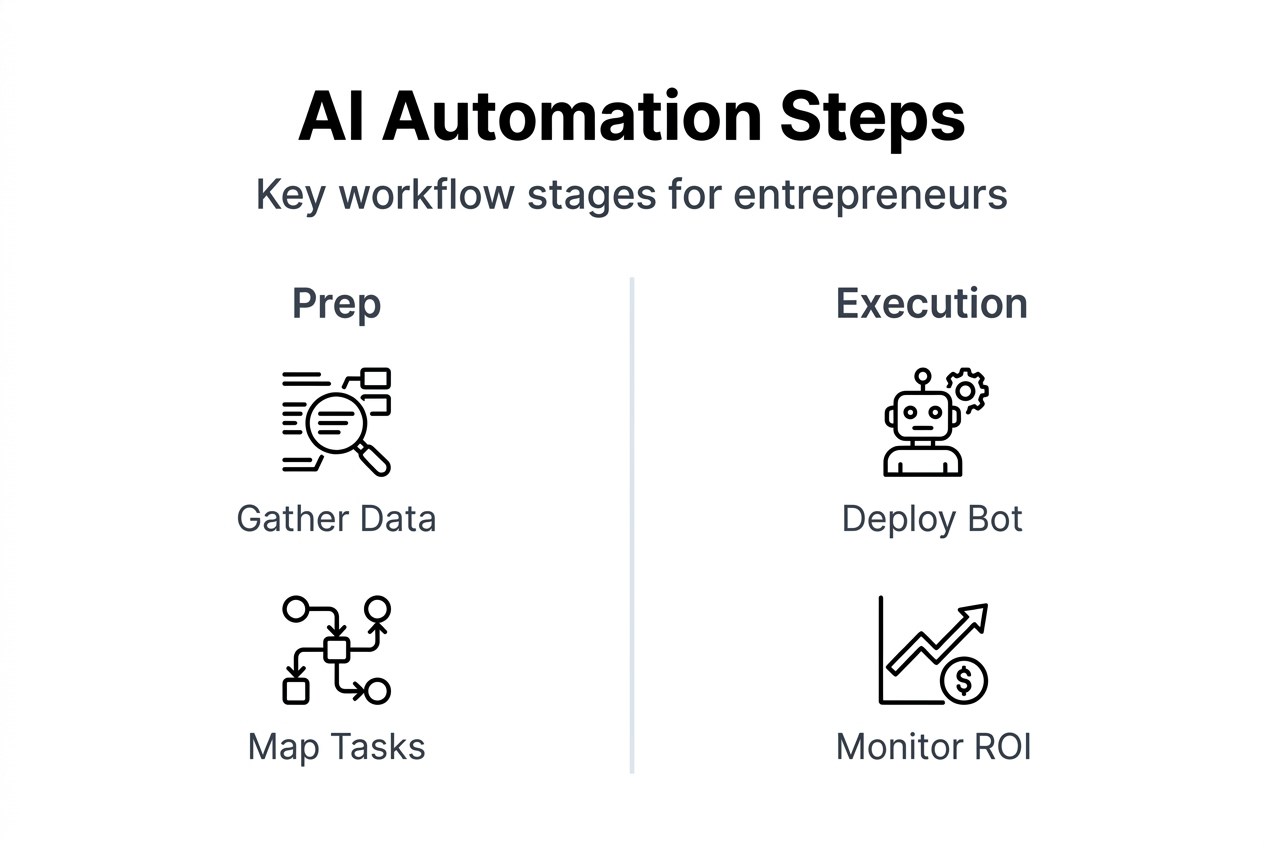
Real results prove the model works. A small family-owned bakery achieved a 200% ROI increase using AI to optimize their advertising and customer targeting. Your business can achieve similar gains by applying AI strategically to your highest-impact workflows.
Compare common automation approaches:
| Approach | Best For | Key Benefits | Potential Risks |
|---|---|---|---|
| Chatbot automation | Customer inquiries, FAQs | 24/7 availability, instant responses | May misread tone, struggle with complex issues |
| Workflow automation | Repetitive admin tasks | Error reduction, time savings | Requires clear rules, brittle with exceptions |
| Email sequences | Lead nurturing, follow-ups | Consistent messaging, scalable | Can feel impersonal if poorly designed |
| Appointment systems | Scheduling, reminders | Reduces no-shows, saves admin time | Needs integration with existing calendar tools |
AI automations work best when they handle predictable, high-volume tasks while routing complex situations to human team members. The key is designing clear handoff protocols that prevent customers from getting stuck in automated loops.
Pro Tip: Use metrics to measure ROI early and adjust workflows accordingly. Track response times, completion rates, customer satisfaction scores, and revenue impact weekly during your pilot phase. This data guides optimization and proves value to stakeholders.
The rise of digital workers in business operations means you can deploy specialized AI agents for different functions, each handling specific workflow components with increasing sophistication.
Verifying results and troubleshooting common challenges
Measurement separates successful automation from expensive experiments. Track these KPIs consistently:
- Response time improvements (target: 80% reduction in initial response delays)
- Task completion accuracy (target: 95%+ for automated processes)
- Customer satisfaction scores before and after automation
- Revenue recovered from automated follow-ups and reminders
- Time saved per week on previously manual tasks
- Cost per transaction or customer interaction
Understand AI’s boundaries. Agentic AI is fast and scalable for safe, rules-based work, but brittle in high-stakes situations. Your automation strategy must account for scenarios where AI should defer to human judgment.
“AI excels at speed and consistency for predictable tasks but struggles with nuance, context, and emotional intelligence. Smart automation design builds in human oversight for situations requiring judgment.”
Watch for these common failure patterns:
- Bots can misread tone leading to customer frustration unlike human agents who adapt communication style
- Automated systems following outdated rules or data, producing incorrect outputs
- Integration failures between systems causing data sync issues
- Edge cases the workflow wasn’t designed to handle, creating customer service bottlenecks
Accountability becomes complex with automation. When an AI agent fails, blame is diffused leaving no clear responsibility. Design your implementation with clear ownership: who monitors performance? Who handles escalations? Who updates workflows when business rules change?
Troubleshoot systematically:
- Review logs and interaction histories to identify failure patterns
- Test workflows with diverse scenarios including edge cases
- Survey customers about their automated interaction experiences
- Implement A/B testing to compare automated versus manual approaches
- Schedule regular workflow audits to catch drift from optimal performance
- Maintain human escalation paths that activate automatically when AI confidence drops
Security deserves constant attention. AI cybersecurity threats evolve rapidly, requiring ongoing vigilance about data protection, access controls, and potential vulnerabilities in automated systems.
AI automation is reshaping enterprise operations with increasing sophistication. Stay current by regularly reviewing the SimplyAI blog for emerging best practices, case studies, and strategic insights that keep your automation competitive.
Discover SimplyAI solutions for your business
You’ve learned the framework for successful AI automation. Now comes implementation. SimplyAI specializes in helping entrepreneurs like you deploy AI automations that deliver measurable results without the complexity of building systems from scratch.
Our AI agents handle customer interactions, workflow automation, and data processing tasks that currently drain your team’s time. We design solutions specifically for small and medium businesses, ensuring quick deployment, predictable costs, and scalable performance as you grow.
Whether you need customer service chatbots, appointment automation, lead nurturing sequences, or custom workflow integrations, SimplyAI builds practical AI solutions tailored to your business needs. Visit SimplyAI to explore how our automation services can transform your operations in 2026.
Frequently asked questions
What is AI automation for entrepreneurs?
AI automation uses software and AI agents to handle routine business tasks automatically, eliminating manual work and human error. These systems manage customer inquiries, schedule appointments, send reminders, process orders, and update records without constant human supervision.
What are the key benefits of AI automation?
Time savings top the list, freeing entrepreneurs to focus on strategy and growth rather than repetitive tasks. AI reduces errors in data entry and customer communications while improving follow-up consistency. Automated workflows operate 24/7, responding instantly to customer needs and capturing opportunities that manual processes miss.
What risks should I watch for with AI automation?
Bots can misread tone and escalate frustration instead of resolving issues, particularly in emotionally charged situations. AI systems fail when encountering scenarios outside their training parameters. Always maintain human oversight and clear escalation paths for complex cases requiring judgment and empathy.
How do I start implementing AI automation successfully?
Begin by identifying one high-impact, repetitive workflow like appointment reminders or customer inquiry responses. Test automation in a controlled environment with a small customer segment. Measure results carefully, refine based on feedback, then scale gradually to additional workflows once you’ve proven ROI.
How much does AI automation cost for a small business?
AI agent workflows solve workflow problems for a fraction of what a full-time employee would cost, typically ranging from $200-$2,000 monthly depending on complexity and scale. This compares to $40,000-$60,000 annually for hiring staff to handle the same volume of work.
What factors affect AI automation pricing?
Costs vary based on workflow complexity, number of integrations with existing systems, transaction volume, and customization requirements. Consider ROI from revenue recovery and efficiency gains when budgeting. Many businesses see positive ROI within 3-6 months of deployment.
What are common pitfalls when implementing AI automation?
Over-reliance on AI without human fallback harms customer satisfaction when automated systems encounter situations they can’t handle properly. Failure to monitor AI tone and response quality increases client frustration over time. When an AI agent fails, blame is diffused between developers, operators, and systems, leaving no one clearly responsible.
How do I avoid AI automation failures?
Maintain ongoing human supervision with clear escalation protocols that activate when AI confidence drops below acceptable thresholds. Test workflows regularly with diverse scenarios including edge cases. Survey customers about their automated interaction experiences and use feedback to refine system responses and decision trees continuously.