
Every small business owner knows the feeling: your inbox is flooded, your phone won’t stop ringing, and your team is buried answering the same ten questions over and over. Manual customer service is a resource drain that scales poorly as your business grows. AI chatbots change that equation entirely. They handle repetitive queries autonomously, free your team for higher-value work, and operate around the clock without fatigue. This guide walks you through every practical step, from planning and preparation to deployment and optimization, so you can implement an AI chatbot that delivers real results.
Table of Contents
- Understanding AI chatbots and their business impact
- What you need before building an AI chatbot
- Step-by-step process to build your business AI chatbot
- Testing, measuring, and improving chatbot performance
- Integrating AI chatbots with your business systems
- Accelerate chatbot success with SimplyAI
- Frequently asked questions
Key Takeaways
| Point | Details |
|---|---|
| Plan with business needs | Start your AI chatbot project by setting clear goals, gathering data, and choosing the right channels. |
| Step-by-step execution | Build, train, and deploy your chatbot using structured steps to maximize impact and minimize errors. |
| Continuous optimization | Monitor performance analytics and user feedback to keep your chatbot effective and relevant. |
| Leverage integrations | Connect your chatbot with existing business systems for streamlined operations and greater automation. |
Understanding AI chatbots and their business impact
An AI chatbot is a software program that simulates human conversation using artificial intelligence. Unlike basic rule-based bots that follow rigid scripts, modern AI chatbots rely on machine learning and Natural Language Processing (NLP) to understand context, interpret intent, and generate relevant responses. NLP is the technology that allows a computer to read and understand human language the way a person would. That distinction matters enormously for business owners who want flexible, intelligent automation rather than a glorified FAQ button.
The business impact is substantial. AI-powered support systems can handle up to 80% of routine customer queries autonomously, which means your human agents spend their time on complex, high-value interactions instead of repetitive tasks. For small and medium-sized businesses operating with lean teams, that kind of leverage is transformative.
The primary benefits extend well beyond cost savings. AI chatbots provide instant responses at any hour, gather valuable customer data with every interaction, and scale effortlessly during peak periods without additional hiring. Common use cases include handling FAQs, guiding new customers through onboarding, qualifying sales leads before they reach your team, and processing simple transactions. Each of these functions represents hours of manual work that your chatbot can absorb automatically.
Now that you see why AI chatbots matter, let’s pinpoint exactly what you’ll need to get started.
What you need before building an AI chatbot
Rushing into development without preparation is the most common reason chatbot projects fail. AI chatbot projects require clear business goals and relevant training data before a single line of code is written. Start by defining what you want your chatbot to accomplish. Is it reducing support ticket volume? Qualifying inbound leads? Booking appointments? A focused goal produces a focused chatbot.
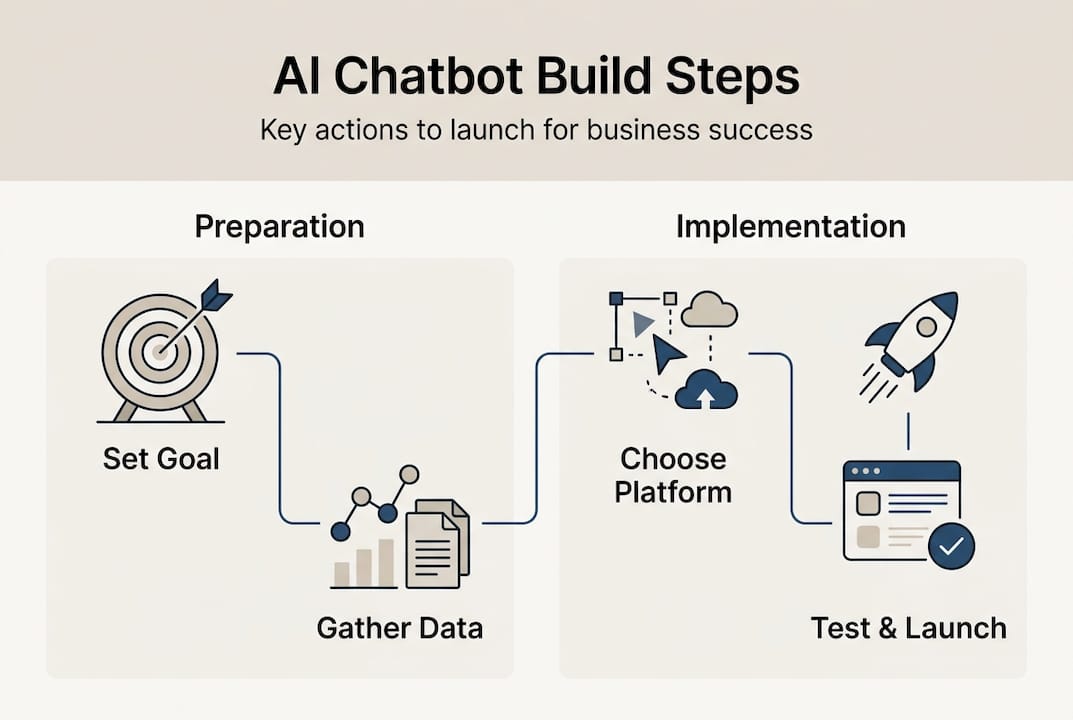
Next, compile the raw material your chatbot will need to learn from. This means gathering your most frequently asked customer questions, your existing knowledge base, product documentation, and any scripts your support team currently uses. The quality of this data directly shapes how well your chatbot performs from day one.
You also need to assess your existing technology infrastructure and budget. Some platforms integrate seamlessly with your current website or CRM; others require custom development. Understanding your constraints early prevents expensive surprises later. Finally, decide which channels you want your chatbot to operate on, whether that is your website, WhatsApp, Facebook Messenger, or a combination.
| Requirement | Details |
|---|---|
| Business goal | Define one primary use case to start |
| Training data | FAQs, knowledge base, support scripts |
| Team involvement | Assign an owner for the chatbot project |
| Technology tools | Platform or development environment |
| Budget | Estimate costs for build, hosting, and maintenance |
For business automation solutions to succeed, every item in that checklist needs an answer before you move forward. If you want a deeper understanding of how autonomous systems operate, understanding AI agents provides useful context on the technology powering modern chatbots.
Pro Tip: Start with one use case, prove its value, then expand. Businesses that try to build everything at once often end up with a chatbot that does nothing particularly well.
With clear goals and materials in place, you’re ready to plan the build.
Step-by-step process to build your business AI chatbot
Building an AI chatbot follows a logical sequence. Skipping steps creates gaps that surface as poor user experiences after launch.
- Design your conversation flows. Map out the paths a user might take when interacting with your chatbot. Identify the most common intents, the questions users will ask, and the responses your chatbot should deliver. Keep flows simple and goal-oriented.
- Choose your development path. You have three main options: custom development (highest flexibility, highest cost), low-code chatbot builders (faster deployment, lower cost), or integration platforms that connect AI capabilities to your existing tools. Low-code AI chatbot builders are now widely available for businesses with limited IT resources, making this the most practical starting point for most SMEs.
- Train your AI model. Feed your chatbot the clean, organized data you compiled during preparation. Data preprocessing directly influences AI accuracy and chatbot performance, so invest time in organizing and cleaning your training data before uploading it.
- Test for edge cases. Run your chatbot through scenarios it was not explicitly trained for. Identify where it fails, where it gives confusing answers, and where it drops the conversation entirely. Document every gap.
- Adjust and refine. Use your test findings to update conversation flows, add missing intents, and retrain the model with corrected data.
- Deploy to your target channels. Launch on the platform where your customers are most active. Monitor closely during the first two weeks.
| Factor | Custom development | Low-code platform |
|---|---|---|
| Cost | High | Low to medium |
| Time to launch | Weeks to months | Days to weeks |
| Flexibility | Very high | Moderate |
| Technical skill needed | High | Low |
| Best for | Complex, unique needs | Most SME use cases |
For businesses exploring lead generation with AI, a well-trained chatbot can qualify prospects automatically before they ever reach your sales team. If you anticipate rapid growth in chatbot usage, auto-scaling for SMBs is worth understanding to ensure your infrastructure keeps pace.

Pro Tip: When development resources are limited, low-code platforms like Tidio, Intercom, or Botpress let you launch a functional chatbot in days rather than months. Speed to market matters more than perfection at the start.
Once your chatbot is live, ensure it meets expectations by monitoring and optimizing performance.
Testing, measuring, and improving chatbot performance
Launching your chatbot is not the finish line. It is the starting point for a continuous improvement cycle that determines whether your investment pays off.
Begin by setting up analytics to track the metrics that matter most. Key metrics for chatbot success include resolution rate, user satisfaction scores, and average response time. Resolution rate tells you what percentage of conversations the chatbot resolves without human intervention. Satisfaction scores reveal how users feel about the experience. Response time confirms the chatbot is delivering on its core promise of speed.
Follow this testing sequence after launch:
- Run structured edge case tests weekly during the first month.
- Collect user feedback through post-conversation surveys or simple thumbs-up/thumbs-down ratings.
- Analyze conversation logs to identify where users abandon the chat or escalate to a human agent.
- Retrain the AI model using corrected and expanded data based on real interactions.
- Update conversation scripts to address newly identified gaps.
Common improvement cycles include retraining the model with fresh feedback data, refining intent recognition for misunderstood queries, and expanding the chatbot’s knowledge base as your product or service offering evolves.
Continuous monitoring is not optional. Businesses that treat chatbot deployment as a one-time project consistently underperform compared to those that build structured review cycles into their operations. The ROI compounds over time when you commit to iteration.
Adaptive AI for automation takes this further by enabling systems that learn and adjust autonomously, reducing the manual effort required to keep your chatbot performing at its best.
Explore how to take your chatbot further by integrating it with other systems.
Integrating AI chatbots with your business systems
A chatbot operating in isolation delivers limited value. The real power emerges when it connects with the tools your business already uses. Integration with existing business tools enables higher ROI and broader automation across your operations.
The most impactful integrations for SMEs include:
- CRM integration: Automatically log customer interactions, update contact records, and trigger follow-up sequences based on chatbot conversations.
- Email marketing platforms: Enroll leads captured by the chatbot directly into nurture sequences without manual data entry.
- Ecommerce platforms: Allow the chatbot to check order status, process returns, and recommend products based on purchase history.
- Helpdesk software: Route unresolved conversations to the right human agent with full context already attached.
- Calendar and booking tools: Let the chatbot schedule appointments or demos directly, eliminating back-and-forth emails.
Integration happens through APIs (direct connections between software systems), plugins offered by your chatbot platform, or middleware tools like Zapier or Make that bridge incompatible systems. Each approach has trade-offs in cost, complexity, and flexibility.
Data privacy deserves serious attention during integration. Any chatbot handling customer data must comply with applicable regulations, including GDPR if you serve European customers. Ensure your platform encrypts data in transit and at rest, and that your privacy policy reflects how chatbot data is collected and used. For businesses managing large volumes of documents, AI document processing can extend your automation further by connecting chatbot interactions with intelligent document workflows.
You now have a firm grasp on implementing AI chatbots. Let’s recap next steps and point to further support.
Accelerate chatbot success with SimplyAI
Building an AI chatbot that genuinely performs requires more than a platform subscription. It requires strategic planning, clean data, thoughtful conversation design, and ongoing optimization. That is exactly where SimplyAI operates.

SimplyAI supports small and medium-sized businesses at every stage of the chatbot journey, from defining goals and designing conversation flows to deploying, integrating, and refining AI systems that deliver measurable results. Whether you need fully managed AI automation services or autonomous AI agents that handle complex workflows, the solutions are built specifically for businesses like yours. Browse the AI prompts gallery to explore ready-to-use resources that accelerate your implementation from day one.
Frequently asked questions
How much does it cost to build an AI chatbot for a small business?
Costs range from free on basic platforms to several thousand dollars for custom integrations, depending on the features, channels, and complexity your business requires.
How long does it take to launch a business AI chatbot?
Low-code AI chatbot builders enable quicker deployment, often within days, while fully custom builds typically require several weeks of development and testing.
What’s the difference between an AI chatbot and a rule-based chatbot?
AI chatbots outperform rule-based versions by using machine learning and NLP to handle flexible, context-aware conversations rather than following fixed decision trees.
Can AI chatbots automate business tasks beyond customer support?
Absolutely. Chatbots improve business automation across support, sales, and workflow tasks, including lead qualification, appointment booking, surveys, and ecommerce transactions.
How do you measure the ROI of an AI chatbot?
Resolution rate and satisfaction are key metrics, alongside time saved per interaction, sales conversions attributed to the chatbot, and reductions in support staffing costs.
Recommended
- AI Automation Services for SMEs | AI Workflow Automation — SimplyAI
- AI Automation Services for SMEs | AI Workflow Automation — SimplyAI
- AI Automation Services for SMEs | AI Workflow Automation — SimplyAI
- AI Automation Services for SMEs | AI Workflow Automation — SimplyAI
- AI Assistant Module — Bitecode | AI chat interface for workflow automation
- How to Use AI to Optimize Your Website Copy: A Complete Guide - Gleef