
Running a small or medium business in 2026 means juggling countless operational tasks while meeting rising customer expectations. Manual processes eat up valuable time, and scaling personalized customer experiences feels impossible without a larger team. AI integration offers a practical solution by automating repetitive workflows and enhancing customer interactions. This guide walks you through a clear, phased approach to implementing AI in your business, from setting objectives to monitoring results, so you can reduce costs and boost satisfaction without overwhelming your team.
Table of Contents
- Identify Your Business Objectives And Prepare For AI Integration
- Choose And Implement AI Solutions Step By Step
- Monitor Performance And Optimize Your AI Systems
- Discover SimplyAI Solutions For Smarter Business Automation
- Frequently Asked Questions About AI Integration For SMBs
Key takeaways
| Point | Details |
|---|---|
| Clear objectives guide AI investment | Define measurable business goals before selecting AI tools to ensure alignment with priorities |
| Phased approach smooths implementation | Start small with pilot projects, then scale up to minimize disruption and learning curves |
| AI drives cost savings and customer satisfaction | Automation reduces manual work while personalizing customer experiences at scale |
| Continuous monitoring maximizes benefits | Track KPIs and adjust systems regularly to sustain ROI and operational improvements |
Identify your business objectives and prepare for AI integration
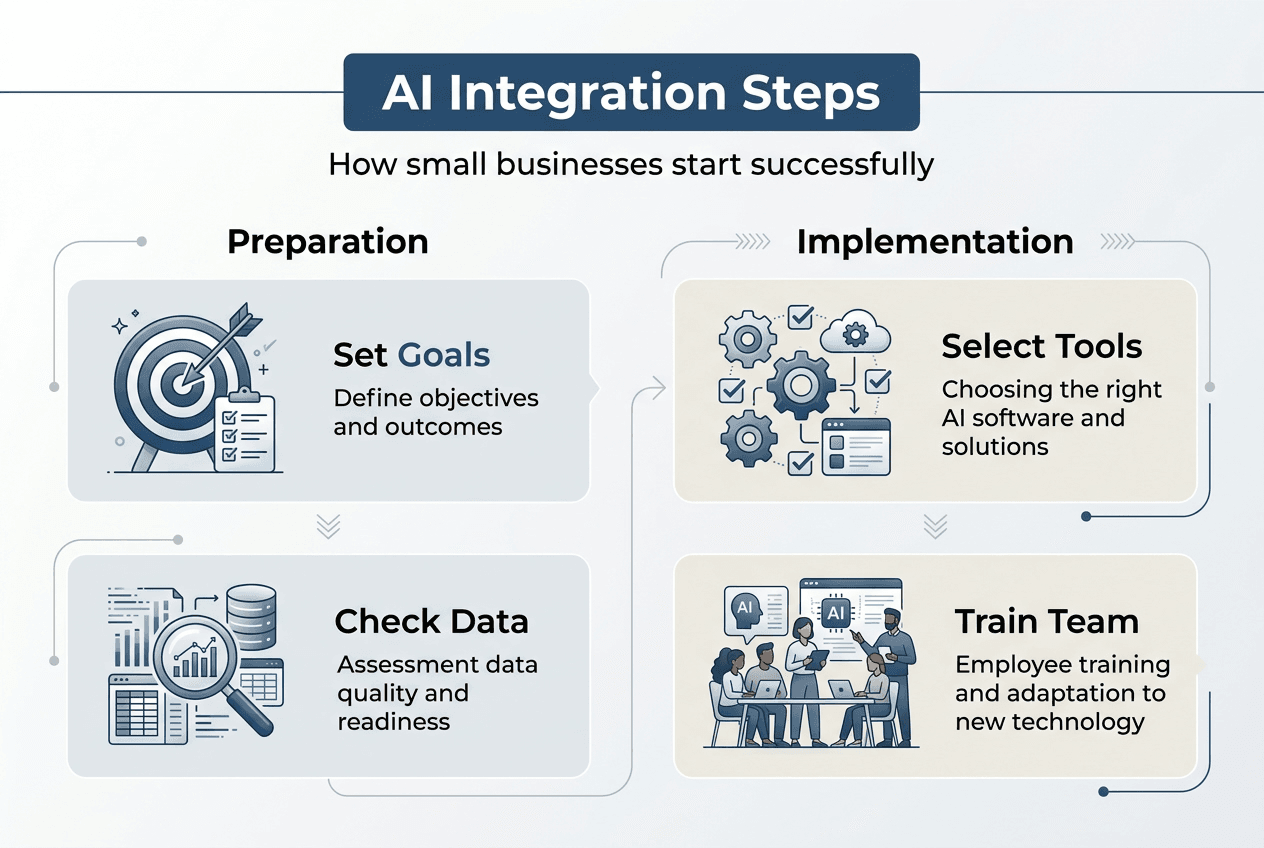
Before investing in any AI technology, you need crystal clear business objectives. SMBs should define clear business objectives before implementing AI to ensure investments align with priorities. Are you trying to cut customer service response times by 50%? Reduce inventory waste by 30%? Automate invoice processing to save 10 hours weekly? Specific, measurable goals keep your AI strategy focused and prevent wasted spending on flashy tools that don’t solve real problems.
Start by engaging your team and key stakeholders in honest conversations about pain points. Your customer service manager knows which questions flood the inbox daily. Your operations lead understands which manual tasks create bottlenecks. These insights reveal where AI can deliver the biggest impact. Alignment across departments ensures everyone understands how AI will change workflows and why the investment matters.
Next, assess your data readiness. AI systems need quality data to function effectively. Review what customer information, sales records, and operational metrics you currently collect. Is it accurate, complete, and accessible? If your data lives in disconnected spreadsheets or outdated systems, you’ll need to consolidate and clean it first. Poor data quality produces unreliable AI outputs, undermining trust in the technology.
Your infrastructure and security protocols also require attention. Cloud storage, reliable internet connectivity, and basic cybersecurity measures form the foundation for AI tools. Most modern AI solutions run on cloud platforms, so you don’t need expensive on-premise servers. However, you do need protocols for protecting customer data and complying with privacy regulations. Building an AI-first organization starts with these fundamental preparations.
Finally, establish a realistic budget and timeline. AI integration doesn’t happen overnight, and trying to transform everything at once leads to chaos. Plan for a phased rollout over several months, allocating funds for software subscriptions, training, and potential consulting support. Starting with a modest budget for one or two use cases lets you prove value before expanding.
Pro Tip: Create a simple one-page document listing your top three business objectives, the specific metrics you’ll track, and your six-month implementation timeline. Share it with your team to maintain focus and accountability throughout the AI integration process.
Choose and implement AI solutions step by step
With objectives defined and prerequisites handled, you’re ready to select and deploy AI tools. The key is starting small and scaling gradually. A phased approach allows smoother implementation and adjustment of AI technologies. Identify one or two high-impact processes where AI can make an immediate difference, such as customer support chatbots, automated email marketing, or inventory forecasting.
Research AI solutions designed specifically for your chosen use cases. For customer support, look at AI chatbot platforms that integrate with your existing communication channels. For marketing automation, explore tools that personalize email campaigns based on customer behavior. For inventory management, consider AI systems that predict demand patterns and optimize stock levels. Read reviews, request demos, and talk to other SMB owners who’ve implemented similar solutions.
Once you’ve selected your initial AI tools, plan a structured rollout in phases:
-
Pilot phase: Deploy the AI solution in a limited capacity, such as handling 20% of customer inquiries or automating one specific marketing workflow. Monitor performance closely and gather feedback from staff and customers.
-
Refinement phase: Use pilot insights to adjust settings, improve training data, and fix issues. This might involve tweaking chatbot responses, refining automation rules, or adjusting prediction algorithms.
-
Expansion phase: Gradually increase the AI system’s scope, handling more inquiries, automating additional workflows, or managing larger inventory volumes. Continue monitoring and making incremental improvements.
-
Full deployment phase: Roll out the AI solution across all relevant operations once you’ve validated its performance and your team feels confident using it.
Staff training makes or breaks AI adoption. Your team needs to understand what the AI does, how to work alongside it, and when to override its decisions. Hands-on training sessions, clear documentation, and ongoing support channels help employees feel comfortable with new technology rather than threatened by it. Emphasize that AI handles repetitive tasks so they can focus on complex, creative work that requires human judgment.

The table below shows common AI use cases for SMBs and typical implementation timelines:
| Use Case | AI Solution Type | Typical Implementation Timeline |
|---|---|---|
| Customer support automation | AI chatbot, virtual assistant | 4 to 8 weeks |
| Email marketing personalization | AI marketing automation platform | 6 to 10 weeks |
| Inventory demand forecasting | AI inventory management system | 8 to 12 weeks |
| Invoice and receipt processing | AI document processing tool | 3 to 6 weeks |
| Lead scoring and sales prioritization | AI CRM integration | 6 to 10 weeks |
SimplyAI’s AI and automations services help businesses navigate this selection and implementation process with expert guidance tailored to your specific industry and operational needs. Professional support accelerates deployment and reduces the trial-and-error that often derails DIY AI projects.
Monitor progress religiously during each phase. Set up dashboards tracking key metrics like response times, conversion rates, cost savings, or error rates. Weekly check-ins with your implementation team ensure problems get addressed quickly. Don’t hesitate to pause and reassess if results fall short of expectations. Adjusting your approach based on real-world performance is far smarter than pushing forward with a flawed implementation.
Pro Tip: Document every configuration change, training update, and process adjustment you make during implementation. This knowledge base becomes invaluable when troubleshooting issues, training new staff, or expanding AI to additional departments. You can reference the AI automation efficiency guide for additional optimization strategies.
Monitor performance and optimize your AI systems
Deploying AI is just the beginning. Continuous monitoring and optimization determine whether your investment delivers lasting value or becomes another abandoned technology project. Continuous monitoring and adaptation are crucial to maximizing AI’s benefits. Track KPIs directly tied to your original business objectives, such as customer satisfaction scores, average handling time, cost per transaction, or revenue per customer.
Set up automated reporting so you receive regular updates on AI performance without manual data gathering. Most AI platforms offer built-in analytics dashboards. Configure alerts for unusual patterns, like sudden drops in accuracy or spikes in error rates. Early detection prevents small issues from snowballing into major problems that erode trust in the system.
Common AI integration challenges include data quality issues, user resistance, integration conflicts with existing software, and unexpected edge cases the AI wasn’t trained to handle. When your chatbot gives nonsensical answers, it usually means the training data contained contradictions or gaps. When staff bypass the AI system, it signals usability problems or lack of confidence in its outputs. When the AI fails to connect with your CRM, it points to API compatibility issues.
Resolve these challenges systematically. For data quality problems, implement regular data audits and cleaning processes. For user resistance, provide additional training and create feedback channels where staff can report issues and suggest improvements. For integration conflicts, work with your IT team or AI vendor to troubleshoot compatibility and update connectors. For edge cases, continuously expand your training datasets with real-world examples.
Iterative tuning amplifies AI performance over time. Review conversation logs to identify common customer questions your chatbot handles poorly, then add those scenarios to its training. Analyze which marketing automation sequences generate the highest engagement, then apply those patterns to other campaigns. Examine inventory forecasts against actual demand to refine prediction models. Small, regular improvements compound into significant performance gains.
The comparison below illustrates typical performance differences between manual and AI-enhanced processes:
| Process | Manual Approach | AI-Enhanced Approach | Improvement |
|---|---|---|---|
| Customer inquiry response time | 4 to 6 hours average | 30 seconds to 2 minutes | 90% to 95% faster |
| Email marketing personalization | Generic segments, 2% to 4% CTR | Individual-level, 8% to 12% CTR | 200% to 300% higher engagement |
| Invoice processing time | 15 to 20 minutes per invoice | 2 to 3 minutes per invoice | 85% to 90% time savings |
| Inventory stockout rate | 12% to 18% of SKUs | 3% to 5% of SKUs | 70% to 80% reduction |
Beyond performance metrics, invest in continuous learning for your team. AI technology evolves rapidly, with new capabilities and best practices emerging constantly. Schedule quarterly training sessions to introduce new features, share success stories from other departments, and address ongoing questions. Encourage knowledge sharing where team members demonstrate clever ways they’ve leveraged AI to solve problems.
Security and compliance monitoring also deserve ongoing attention. Regularly review who has access to AI systems and the data they process. Ensure your AI vendor provides updates and patches promptly. Stay informed about regulatory changes affecting AI use in your industry, particularly around customer data privacy and algorithmic transparency. You can explore using AI in business guide for comprehensive governance frameworks.
Pro Tip: Schedule monthly AI performance reviews where you examine three key metrics, one success story, and one challenge. This rhythm keeps optimization efforts consistent without becoming overwhelming, and celebrating wins maintains team enthusiasm for AI initiatives.
Discover SimplyAI solutions for smarter business automation
Navigating AI integration alone can feel overwhelming, especially when you’re already managing daily business operations. SimplyAI specializes in helping small and medium businesses implement practical AI solutions that deliver measurable results without the complexity.

Our AI and automations services design custom workflow automations tailored to your specific processes, whether you need to streamline customer onboarding, automate invoice processing, or optimize marketing campaigns. We handle the technical implementation so you can focus on running your business. Additionally, our AI agents services deploy intelligent virtual assistants that manage customer interactions, qualify leads, and handle routine inquiries 24/7, dramatically reducing response times while maintaining personalized service quality. With expert support throughout implementation and ongoing optimization, SimplyAI turns AI integration from a daunting project into a smooth transformation that accelerates growth and efficiency.
Frequently asked questions about AI integration for SMBs
What is the first step in AI integration for my business?
The first step is defining clear, measurable business objectives that AI will help you achieve. Identify specific pain points like slow customer response times or manual data entry bottlenecks, then set quantifiable targets such as reducing response time by 50% or cutting processing time by 10 hours weekly. This focus ensures you invest in AI solutions that solve real problems rather than chasing technology for its own sake.
How long does it take to see results from AI implementation?
Most SMBs see initial results within 4 to 8 weeks of deploying their first AI solution, depending on the use case and implementation complexity. Simple automations like chatbots or email marketing tools often show impact faster, while inventory forecasting or complex workflow automation may take 10 to 12 weeks. The phased approach allows you to validate early wins before expanding, building momentum and confidence in the technology.
What common mistakes should I avoid during AI integration?
Avoid trying to automate everything at once, which overwhelms your team and dilutes focus. Skipping staff training leads to resistance and poor adoption rates. Neglecting data quality produces unreliable AI outputs that undermine trust. Finally, failing to monitor performance means you miss opportunities to optimize and may not catch problems until they’ve caused significant damage. Start small, train thoroughly, clean your data, and track results religiously.
Can AI improve customer satisfaction for small businesses?
Absolutely. AI-powered chatbots provide instant responses to common questions 24/7, eliminating frustrating wait times. Personalized marketing automation delivers relevant offers based on individual customer behavior, making interactions feel more thoughtful. AI-enhanced inventory management reduces stockouts so customers find what they need when they need it. These improvements directly boost satisfaction scores while freeing your team to handle complex requests requiring human empathy and creativity.
Is ongoing AI staff training necessary?
Yes, continuous training is essential for maximizing AI benefits. AI tools evolve with new features and capabilities that your team should leverage. Regular training sessions help staff become more proficient, discovering advanced techniques that improve efficiency. Training also addresses emerging challenges and shares best practices across departments. Quarterly sessions combined with accessible documentation ensure your team stays confident and effective as your AI systems grow more sophisticated.