
Small and medium businesses waste countless hours manually entering data from invoices, contracts, and forms. This repetitive work drains resources, introduces errors, and slows down operations. Artificial intelligence is transforming how companies handle documents by automating extraction, classification, and validation tasks. This guide explains what AI in document processing actually means, which technologies power it, and how your business can benefit from adopting these practical solutions to reduce manual work and improve accuracy.
Table of Contents
- Key takeaways
- Understanding AI in document processing
- How AI improves document management compared to manual methods
- Types of AI applications in document processing
- Implementing AI in document processing for your business
- Discover SimplyAI solutions for smarter document processing
- Frequently asked questions about AI in document processing
Key Takeaways
| Point | Details |
|---|---|
| AI automates data extraction | AI systems extract, categorize, and validate data from documents, reducing manual data entry and errors. |
| Accuracy and speed gains | Automation provides consistent accuracy and reduces processing time from minutes per document to seconds. |
| Prioritize high volume docs | Starting with invoices and similar high volume documents delivers quick ROI and builds confidence in the technology. |
| Implementation alignment | Success depends on aligning AI tools with business needs and selecting suitable technologies. |
Understanding AI in document processing
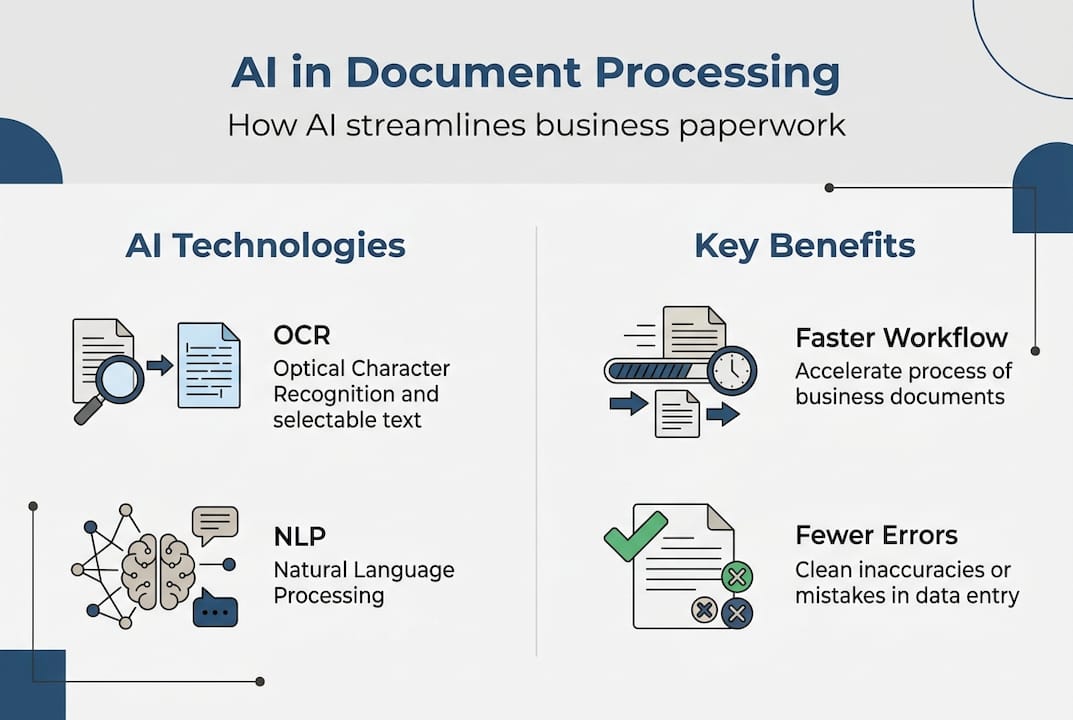
AI in document processing uses technologies such as optical character recognition (OCR), natural language processing (NLP), and machine learning to interpret and manage text-heavy documents automatically. Instead of employees manually reading and typing information from papers or PDFs, AI systems extract, categorize, and validate data in seconds.
OCR technology converts images of text into machine-readable characters. When you scan a paper invoice, OCR transforms the visual information into editable text your systems can process. NLP goes further by understanding context and meaning within documents. It recognizes that “net 30” refers to payment terms, not a fishing tool, and can extract relevant fields based on semantic understanding rather than just pattern matching.
Machine learning enables these systems to improve accuracy over time. As the AI processes more documents, it learns from corrections and adjustments, becoming better at handling variations in formats, handwriting, and document layouts. This continuous improvement means your system gets smarter with use.
Common document types that benefit from AI automation include:
- Invoices and purchase orders requiring data entry into accounting systems
- Receipts needing expense categorization and approval routing
- Contracts requiring clause extraction and compliance verification
- Customer forms demanding information capture and validation
- Shipping documents needing tracking and inventory updates
Pro Tip: Start your AI adoption journey with high-volume document types to maximize impact and ROI quickly. Processing hundreds of invoices monthly delivers immediate time savings and builds organizational confidence in the technology.
For businesses exploring broader AI assisted analytics, document processing serves as an excellent entry point. The results are tangible, measurable, and directly impact daily operations.
How AI improves document management compared to manual methods
Manual document processing creates significant operational friction. Employees spend hours typing information from papers into systems, introducing typos and misreading handwritten notes. Processing backlogs grow during busy periods, delaying customer responses and payment cycles. Labor costs scale linearly with document volume, making growth expensive.
AI-powered document processing reduces errors and accelerates workflow compared to traditional manual entry. Automated systems extract data with consistent accuracy, typically achieving 95-99% precision after proper training. Processing time drops from minutes per document to seconds, enabling same-day turnaround even during peak periods.

Here is how AI stacks up against manual methods:
| Factor | Manual Processing | AI Processing |
|---|---|---|
| Error rate | 3-5% typical human error | Under 1% with trained models |
| Processing time | 3-5 minutes per document | 10-30 seconds per document |
| Cost per document | $5-15 depending on complexity | $0.50-2 after implementation |
| Scalability | Requires hiring more staff | Handles volume increases automatically |
| Consistency | Varies by person and fatigue | Uniform quality across all documents |
Key benefits of AI document processing include:
- Improved compliance through consistent application of validation rules and audit trails
- Data consistency across systems by eliminating transcription variations
- Faster customer response times by accelerating order processing and inquiry handling
- Cost savings from reduced labor needs and fewer error-related corrections
- Better resource allocation as staff focus on judgment-based tasks instead of data entry
AI systems also detect anomalies automatically. Unusual invoice amounts, missing required fields, or inconsistent vendor information trigger alerts for human review. This proactive quality control catches issues before they impact operations or finances.
Businesses adopting AI automation report significant improvements in document throughput without proportional increases in headcount. A company processing 500 invoices monthly can scale to 2,000 invoices with the same AI system and minimal additional resources. This scalability transforms document management from a constraint into an enabler of growth.
The benefits of AI automation extend beyond speed and accuracy. Employees freed from repetitive data entry can focus on customer relationships, strategic analysis, and problem-solving activities that drive business value.
Types of AI applications in document processing
Understanding specific AI solutions helps you identify which capabilities match your business needs. Here are the major applications available:
-
Automatic data extraction captures specific fields from documents without human intervention. The system identifies invoice numbers, dates, amounts, vendor names, and line items, then populates your accounting or ERP system directly. This eliminates manual typing and ensures data flows seamlessly between systems.
-
Document classification and sorting automatically categorizes incoming documents by type. Invoices route to accounts payable, contracts go to legal review, and customer inquiries reach service teams. This intelligent routing accelerates processing by ensuring documents reach the right people immediately.
-
Information validation and verification checks extracted data against business rules and external sources. The system confirms vendor details match your approved supplier list, validates tax calculations, and flags discrepancies for review. This automated quality control prevents errors from propagating through your systems.
-
Sentiment and intent analysis examines customer communications to understand tone and purpose. Customer service teams receive prioritized alerts for urgent or negative feedback, enabling faster response to critical issues. This application proves especially valuable for processing feedback forms, support tickets, and survey responses.
-
Workflow orchestration and automation connects document processing to downstream actions. After extracting invoice data, the system can trigger approval workflows, schedule payments, update inventory records, and send confirmation emails. This end-to-end automation eliminates handoffs and reduces cycle times dramatically.
Pro Tip: Choose AI solutions that integrate well with your existing systems to avoid workflow disruption. Native connections to your accounting software, CRM, and other core platforms ensure smooth data flow and minimize implementation complexity.
Combining multiple AI capabilities yields synergistic results. A comprehensive digital transformation approach might use classification to sort documents, extraction to capture data, validation to ensure accuracy, and orchestration to trigger appropriate workflows. This integrated approach delivers greater value than implementing isolated point solutions.
Implementing AI in document processing for your business
Successful AI adoption requires thoughtful planning and execution. Start by assessing your current document processes to identify bottlenecks, error-prone steps, and high-volume workflows. Understanding where problems exist helps you prioritize which documents to automate first and set realistic improvement targets.
Follow these key implementation steps:
-
Define clear objectives for your AI initiative. Specify whether you want to reduce processing time, improve accuracy, lower costs, or enable scalability. Concrete goals guide technology selection and provide metrics to measure success.
-
Choose appropriate AI technologies that match your document types and complexity. Simple forms with consistent layouts may need only basic OCR, while complex contracts with varied formats require advanced NLP and machine learning capabilities.
-
Pilot test with select document types before full deployment. Starting small allows you to validate accuracy, refine extraction rules, and demonstrate value without disrupting operations. Use pilot results to build organizational support and secure resources for broader rollout.
-
Train staff on new workflows and system interactions. Employees need to understand how AI changes their roles, what tasks remain manual, and how to handle exceptions the system flags for review. Change management determines whether AI adoption succeeds or stalls.
-
Scale progressively by expanding to additional document types and higher volumes. Monitor performance metrics, gather user feedback, and continuously optimize extraction accuracy and workflow efficiency.
Best practices for successful implementation include:
- Ensuring data privacy by selecting AI solutions with appropriate security controls and compliance certifications
- Monitoring AI accuracy through regular audits and validation checks
- Continuous optimization by reviewing error patterns and retraining models
- Maintaining human oversight for complex decisions and exception handling
- Documenting processes and building institutional knowledge about your AI systems
Successful AI adoption requires clear goal-setting, investing in training, and selecting scalable tools that fit your specific business needs. Organizational readiness matters as much as technology capability. Companies that prepare their teams, adjust workflows thoughtfully, and commit to continuous improvement achieve better outcomes than those treating AI as a simple plug-and-play solution.
Selecting adaptable AI tools supports long-term success. As your business grows and document types evolve, flexible platforms accommodate new requirements without requiring complete replacement. Integration capabilities with other systems enable you to build custom AI solutions that address your unique workflows and business logic.
Discover SimplyAI solutions for smarter document processing
Transforming your document workflows with AI does not require building systems from scratch or managing complex implementations alone. SimplyAI provides comprehensive AI automation services and AI agents specialized for small and medium businesses like yours.

Our solutions deliver customizable workflows that match your specific document types and business processes. Intelligent data capture handles invoices, contracts, forms, and receipts with high accuracy. Seamless integration with your existing accounting, CRM, and operational systems ensures smooth data flow without disrupting established workflows.
SimplyAI helps you enhance operational efficiency through AI-powered automation designed for practical results. We work with you to identify high-impact opportunities, implement solutions that deliver measurable improvements, and provide ongoing support as your needs evolve. Visit our service pages to explore how we can help you reduce manual work, improve accuracy, and scale your document processing capabilities.
Frequently asked questions about AI in document processing
What types of documents can AI process automatically?
AI systems handle invoices, receipts, purchase orders, contracts, shipping documents, customer forms, tax documents, and correspondence. The technology works with both structured documents like standardized forms and unstructured documents like emails or letters. Most business documents containing text are candidates for AI processing.
How accurate is AI compared to manual data entry?
Properly trained AI systems typically achieve 95-99% accuracy, compared to 95-97% for manual entry. AI maintains consistent accuracy regardless of volume or time of day, while human performance varies with fatigue and distraction. The key difference is AI processes documents in seconds rather than minutes, delivering both speed and precision.
Do I need technical expertise to implement AI document processing?
Modern AI platforms offer user-friendly interfaces that business users can configure without programming skills. However, initial setup, integration with existing systems, and optimization benefit from technical guidance. Many businesses partner with AI service providers to handle implementation while internal teams focus on defining requirements and managing workflows.
How long does it take to see ROI from AI document processing?
Most businesses see positive returns within 3-6 months after implementation. Time savings appear immediately as AI begins processing documents, while accuracy improvements and cost reductions accumulate over time. Faster ROI comes from starting with high-volume document types where automation delivers the greatest impact.
Can AI handle handwritten documents and poor-quality scans?
Advanced AI systems with machine learning capabilities can process handwriting and low-quality images, though accuracy depends on legibility. Clear handwriting and decent scan quality yield better results. Many solutions include confidence scoring that flags uncertain extractions for human review, ensuring quality control even with challenging documents.
What happens when AI encounters a document it cannot process?
Well-designed AI systems route exceptions to human reviewers when confidence falls below acceptable thresholds. These exceptions provide learning opportunities as humans correct the AI, improving future accuracy. Effective implementations balance automation rates with quality control, ensuring problematic documents receive appropriate attention.